3D Anime Fire Knight Girl Character Sheet | Epic Fantasy Render
Description
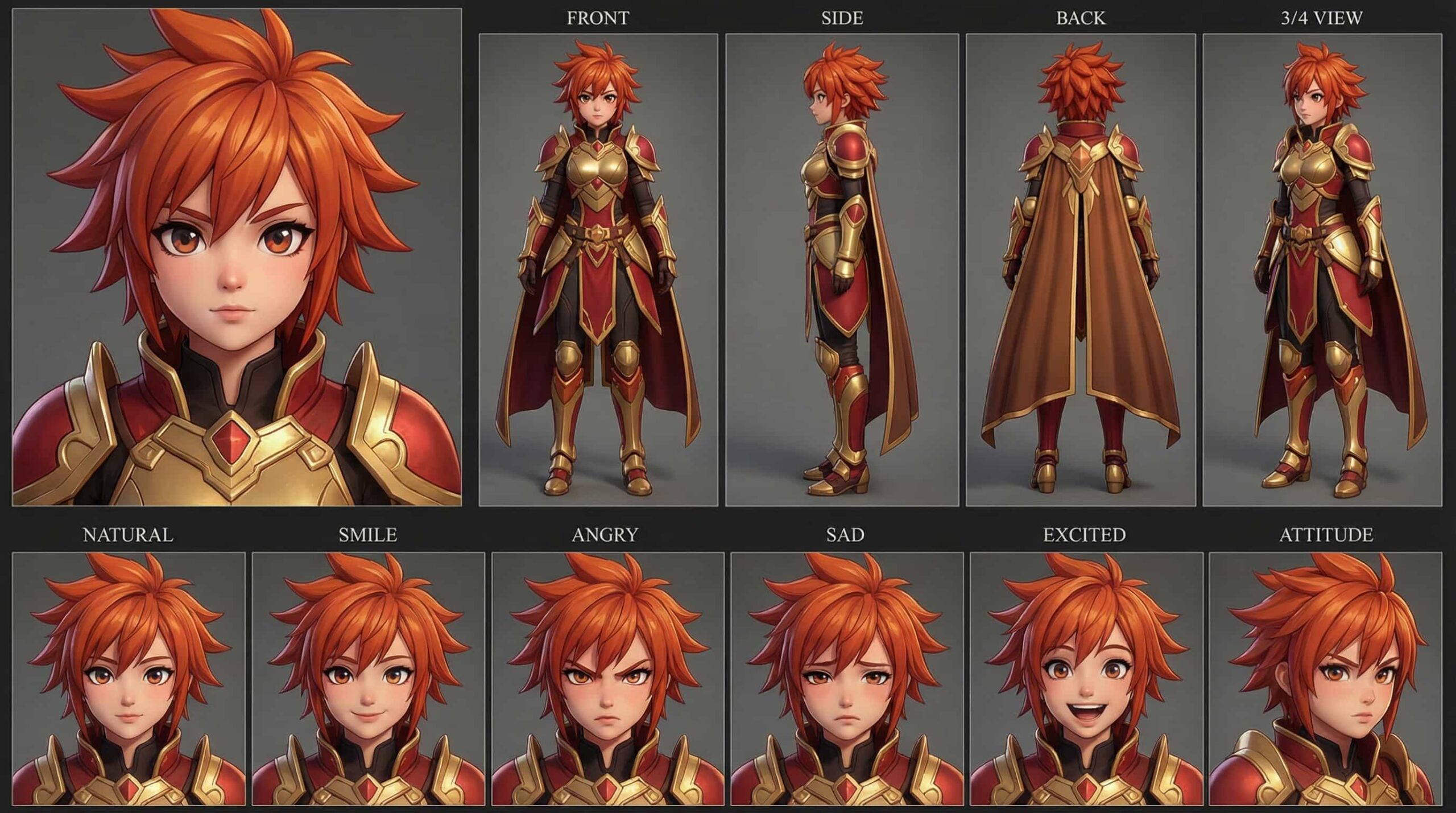
A powerful 3D anime fire knight character with fiery orange hair and matching eyes, clad in striking red and gold heavy armor with a flowing cape. Her commanding presence and...
A powerful 3D anime fire knight character with fiery orange hair and matching eyes, clad in striking red and gold heavy armor with a flowing cape. Her commanding presence and vibrant stylized 3D render make her an exceptional choice for fantasy war games, epic cinematic projects, or character design inspiration
Prompt
Your task is to generate a high-quality cinematic video using the provided character sheet as the ONLY reference for the character.
--- CHARACTER LOCK...
Your task is to generate a high-quality cinematic video using the provided character sheet as the ONLY reference for the character.
--- CHARACTER LOCK RULES (STRICT) ---
- Use the EXACT same character from the provided character sheet
- DO NOT change face, identity, hairstyle, or facial features
- DO NOT change outfit
- Maintain consistent body proportions and character design
- Preserve the same art style, rendering style, and visual quality
- The character must look identical in every frame
--- VISUAL QUALITY RULES ---
- Cinematic lighting
- High detail, 4K quality
- Depth of field, motion blur where appropriate
- Realistic shadows and reflections
- Smooth animation, no flickering or distortion
--- CAMERA & MOTION ---
- Use dynamic cinematic camera angles (close-up, medium, wide shots)
- Add natural camera movement (pan, tilt, dolly, tracking)
- Maintain smooth transitions between shots
--- SCENE CONSISTENCY ---
- Environment must match the action logically
- Lighting should match scene mood
- No random background changes
- Keep visual continuity across the entire video
--- CHARACTER BEHAVIOR ---
- Natural body movement
- Realistic expressions
- Emotion must match the action
ACTION / STORY:
--- OUTPUT INSTRUCTIONS ---
Generate a cinematic video scene based on the action above while strictly following all character and visual consistency rules.
How to Create AI Videos Using Character Sheets
1. Prepare: Download your character sheet to use as your primary Reference Image.
2. Customize Prompt: Copy the Prompt Template and only update the "Action/Story" section with your scene (e.g., character...
1. Prepare: Download your character sheet to use as your primary Reference Image.
2. Customize Prompt: Copy the Prompt Template and only update the "Action/Story" section with your scene (e.g., character walking in rain).
3. Choose Tool: Open an AI generator like Runway ML, Pika, or Leonardo AI.
4. Generate:
* Upload the character sheet.
* Paste your customized prompt.
* Set settings to 1080p and Medium Motion.
5. Finalize: Generate, download, and use for TikTok, Reels, or YouTube.
🔥 Pro Tips:
Consistency: Always use the same reference sheet for the same character.
Keywords: Use "cinematic lighting" or "slow motion" for better quality.
Iterate: Generate 2–3 variations to get the perfect shot.